

Transactions
Transactions record the money that moved in or out of a plan and when: contributions and transfers arriving, funds bought and sold, income paid out, withdrawals and fees. They give you the plan's cash history for a review or a cost and charges check.
Where to find it
Transactions are a tab on each plan's page, at https://app.templi.ai/plans/<plan>/transactions. To get there, open the client, click their Plans tab, click the plan, then click Transactions. You can also start from Library > Plans. The plan's Overview tab lists the five most recent transactions. See Plans for the rest of the plan's page.
See a plan's transactions
Open the plan and click the Transactions tab. Each row shows the date, type, description, amount and where it came from. Use the buttons to show only Trades, Contributions, Withdrawals, Income or Fees, and the holdings filter to see one fund's transactions.
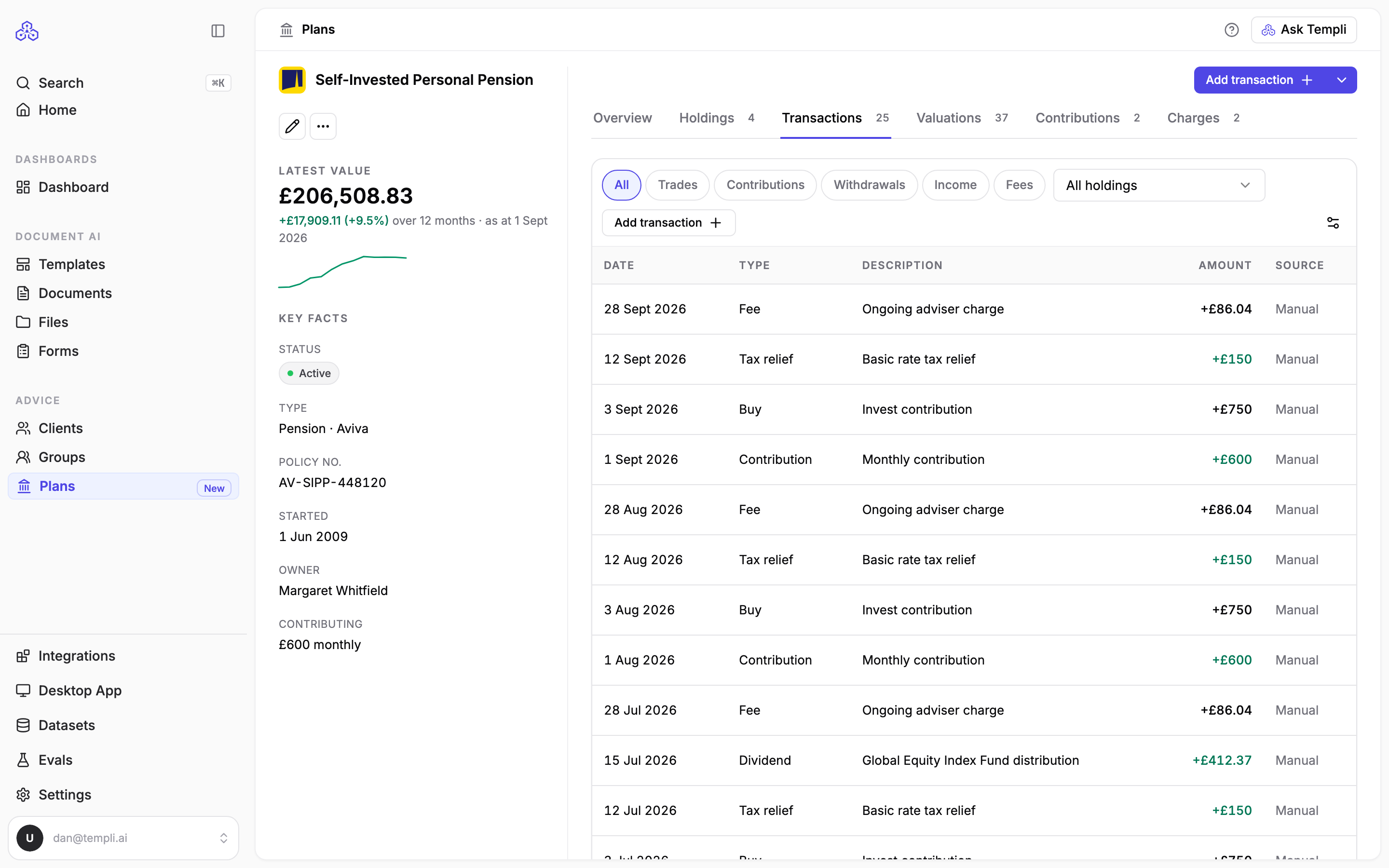
A transaction you recorded yourself shows Manual in the source column.
Add a transaction
Back-office systems do not send transactions, so record the ones you need from the provider's statement.
On the Transactions tab, click Add transaction.
Pick the kind of transaction at the top: Trades, Contributions, Withdrawals, Income or Fees.
Choose the Type and enter the Date.
If it relates to one fund, choose it under Holding. Otherwise leave it as No specific holding.
Add a Description, such as Monthly drawdown income.
Enter the Amount as a positive figure, and the Units and Unit price when the form asks for them. Templi records buys, withdrawals and fees as money out, and sells, income and contributions as money in.
Add the Provider reference and any Notes, then click Add transaction.
The date and amount are required. To change a transaction, click its row.
Each kind offers these types:
Kind | Types |
|---|---|
Trades | Buy, Sell |
Contributions | Contribution, Transfer in |
Withdrawals | Withdrawal, Transfer out |
Income | Dividend, Interest |
Fees | Fee |
To record what a client pays in going forward, add a contribution rather than a transaction. Contributions set the plan's Contributing figure; transactions record individual payments that have already happened.
Ask Templi about transactions
Templi reads a plan's most recent transactions when you ask about it in Ask Templi, for example What were the last few transactions on Sarah Winters' SIPP? or Has any drawdown income been paid from Sarah's SIPP recently? Templi cannot record transactions for you, so add them from the Transactions tab.