

Generate a report
Generate a report from a published template by choosing the client and the files Templi should work from. Templi writes every AI block in the template and opens the report for you to review.
Only published templates can generate reports. If the template is still a draft, publish it first from Edit a Word template.
Generate from the Templates page
Open Templates and click Generate beside the template.
Under Clients, click Choose clients. Templates that need a client mark this as required.
Under Files and sources, drop the files for this case, or click choose from Files. Add the fact find, provider statements, valuations and meeting notes the report should draw on.
Optionally, add Anything the agent should know, such as "Focus on consolidating the two ISAs."
Click Generate.
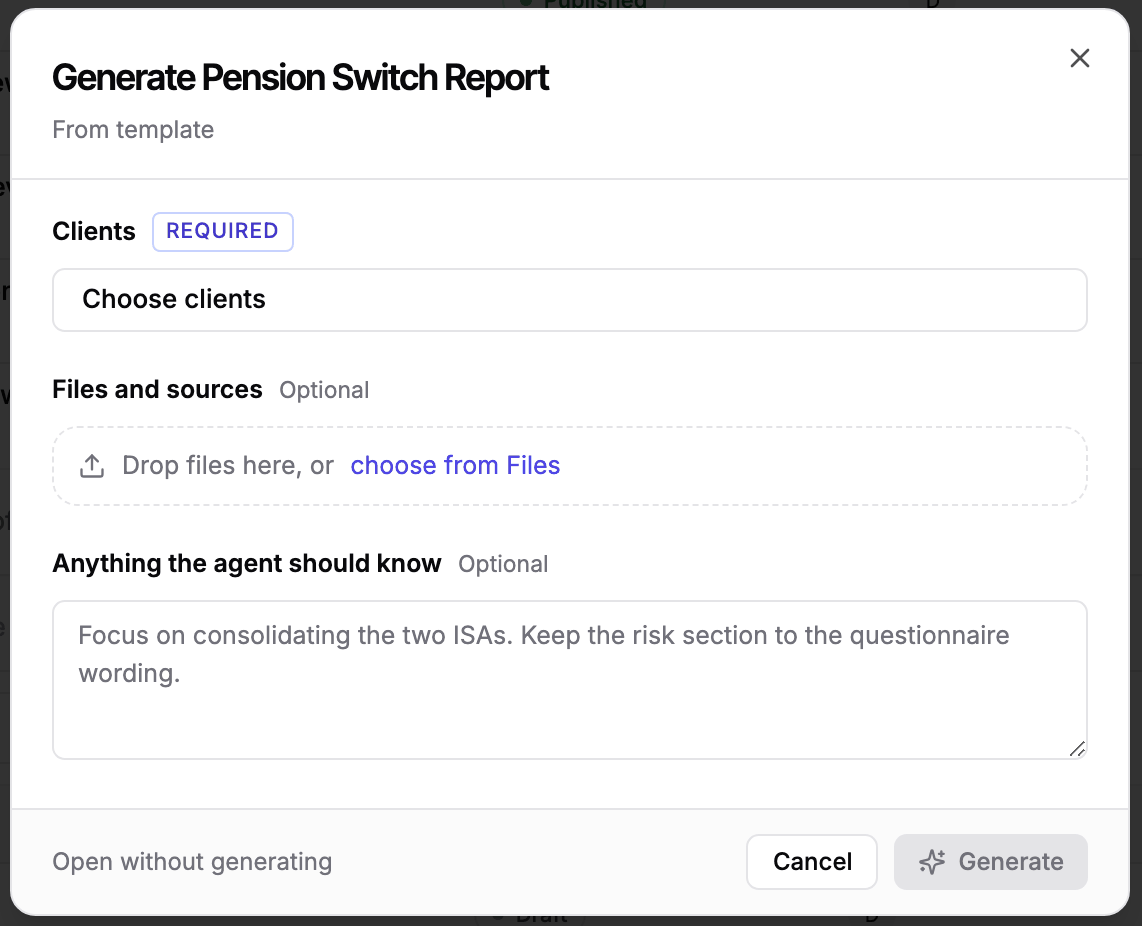
The report opens straight away, with Templi's chat beside it while it writes. Click Open without generating instead if you want the report created without Templi writing it yet.
You can start the same dialog from other places too:
Documents: click Create new and pick a template.
A client's record: click Generate Report, so the client is already chosen.
Search: choose New document.
Generate by asking Templi
Name the template, the client and anything Templi should use. Ask Templi can generate reports for several clients in one request. For example:
"Generate the Pension Switch Report for Sarah Winters using her Harbour Life statement and yesterday's meeting notes."
"Write annual review letters for John Doe and Sarah Williams. John has £2,400 of ISA allowance left and Sarah has £14,200."
Next step
Every generated report waits for you to check it. See Review a report.